Reflection Ruining Your Photo? That’s Why Adobe Made Its New AI Removal Tool
Chances are you’ve taken a perfect photo, with great lighting and composition, that was completely ruined by a reflection. I’ve certainly had many museum and aquarium shots ruined by the reflection of me holding up my phone, obscuring the painting or sea turtle I’m trying to capture. That’s why Adobe’s newest editing feature uses AI to make it easier to remove reflections.
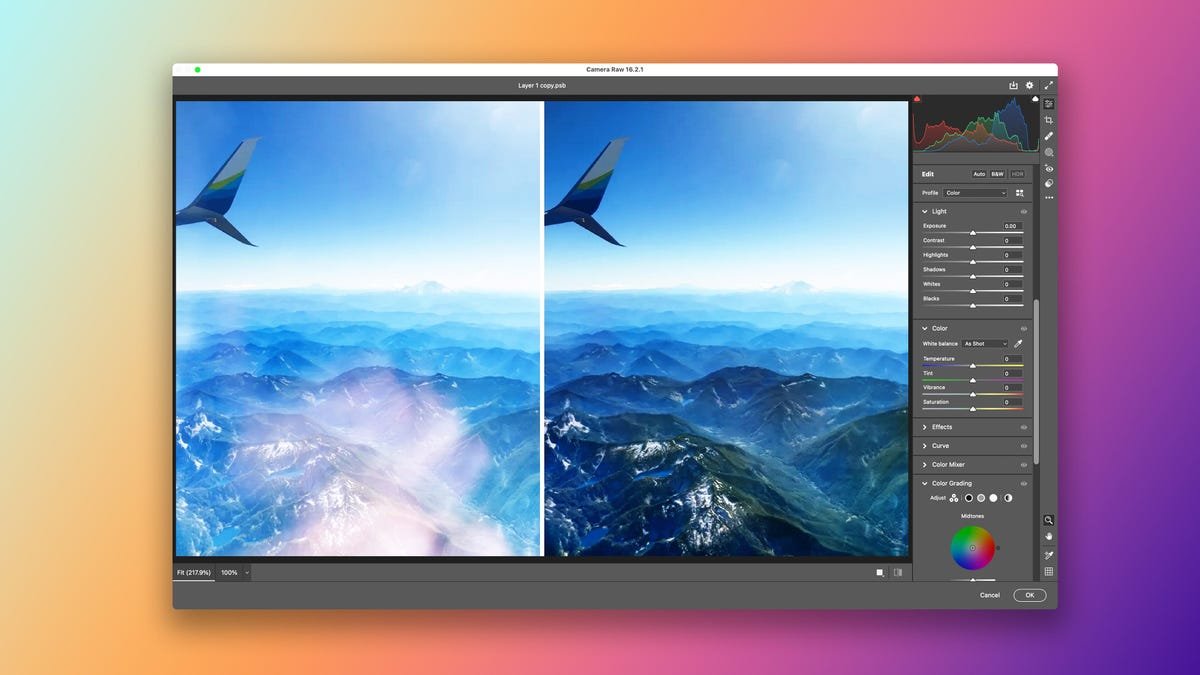
Reflection removal was announced last week as a brand new feature in the Camera Raw plugin for Photoshop. “Our goal is to help you turn a photo you might otherwise delete into one that is good enough to share,” Marc Levoy, Adobe vice president and fellow, said in a blog post.
In an exclusive interview with CNET, Levoy walked us through how the tool works, why the team didn’t use generative AI and what comes next.
The one-click tool can make a big difference in the before (left) and after (right).
Building reflection removal
Although Levoy has only been at Adobe since 2020, he’s a powerhouse in the world of digital photography. His work as a Stanford University researcher helped pioneer computational photography and the digital process of capturing and processing images and graphics. He helped lead Google’s respected Pixel camera app team and is a member of the National Academy of Engineering.
Since joining Adobe, Levoy’s worked on a variety of projects with photography and AI, including launching a camera app for Adobe, the now-discontinued Photoshop Camera. In an interview with CNET in 2022 discussing Levoy’s vision for the app, he specifically called out how much he’d love to ship a tool to deal with reflections. While much of the tech in the camera app has since found a new home in Adobe Express, the one-click reflection removal tech Levoy imagined in 2022 is now a reality in Camera Raw.
A big part of how the tool works is thanks to AI. However, the feature does not use generative AI, so it doesn’t create new elements or regions in an image. Photographs with reflections are like the sum of two different images, Levoy explained. The job of reflection removal — and the AI model behind it — is to distinguish the two.
“Removing window reflections comes down to separating a photo that is polluted by reflections into a transmission image (the scene through the window) and a reflection image (the scene behind the photographer). A separation task is very different from a generation task and calls for a different kind of AI model,” said Levoy.
The new reflection removal tool is able to scan the original photo (left) and separate the main subject, the dog (center) from the distracting garden reflection (right).
Levoy and his team, Eric Kee and Adam Pikielny, trained the model using pairs of clean and reflection-riddled images to create new images that combined the original image with a reflection. The model then had to correctly identify what the original images were, teaching it to separate the intended subjects from accidental reflections. The removal tool is now adept at isolating the different images, meaning creators don’t need to edit out reflections with generative AI.
“There’s no reason to use generative AI on those sections where both the transmission and reflection scenes are partly visible,” said Levoy.
For generative-AI-wary photographers, this is good news. Adobe has spent a lot of time and money upgrading its photo and video editing to incorporate AI. AI took center stage at the company’s annual creative conference this year, where generative AI was powering everything from smoother video transitions to completely relighting dark photos. There might be cases when Adobe’s generative AI editing tools could help with photos where the reflections are so bright it saturates the camera sensor to white. But reflection removal offers photographers a nongenerative way to quickly deal with those distractions.
In this example of a California tidal pool, reflection removal cleans up those pesky smartphone and sky reflections.
Reflection removal currently works with raw images and is available as a beta technology preview (meaning it’s available now, but it’s still being actively worked on). In the future, Adobe plans to expand the AI tool to be compatible with other image file types, like JPEGs and HEICs, and refine the tool to remove smaller reflections. It also plans to introduce the tool to its Lightroom ecosystem, something Levoy is especially jazzed about.
“I can’t wait until this feature is available in Lightroom Mobile,” said Levoy. “I want to go to the aquarium, take a photo of the shark tank that is polluted by reflections, click a button and admire the resulting clean photo, while the people around me stare in disbelief at the image on my phone. I’ll smile and tell them how to download the feature to their own phone.”